Analyzing 2018 World Cup match data with Clojure

So, Russia 2018 World Cup is over. There were lots of good moments, and some worse (especially for us, here in Poland….). But is there something we can learn from this event as programmers? Recently, I had a few free evenings and played a bit with a World Cup API. In this post I want to show you what is Clojure way of dealing with REST APIs and when it beats other languages in this field.

TLDR; The code is on GitHub. Setup is based on Atom and proto-repl package which makes the interactive development experience really pleasant. I highly recommend you follow its installation guide while dealing with my solution.

As a problem to solve, I wanted to find something not trivial, to show some of the Clojure super-powers. Finally, I came up with this:

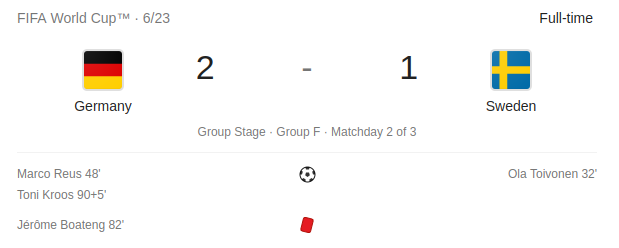
The problem: find all matches the winning team made a come-back — they lost a goal first, but managed to win.

For example Sweden — Germany in a group stage:
Ok, so a good starting point would be getting all matches data for further processing. I’m using clj-http as an http client (with cheshire for json parsing support):

(ns worldcup.matches
  (:require
    [clj-http.client :as http]))

(def api-root "https://worldcup.sfg.io")

(defn get-all-matches []
  (->
    (http/get (str api-root "/matches") {:as :json})
    :body))

The Clojure philosophy relies heavily on dealing with built-in data structures. In statically typed languages you’d probably start with modelling response JSON as some POJO classes; here you just get a map and can start to investigate it right from the beginning. Huge difference.

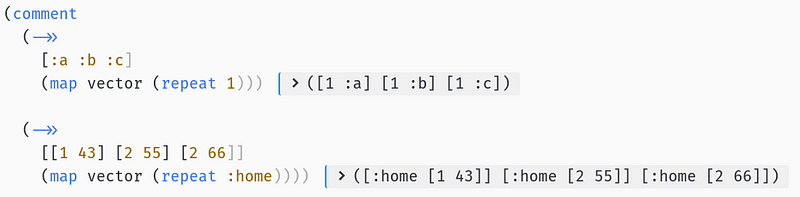
One thing that may not be clear in the above code is this -> macro. It is really helpful for nested collection operations. Instead of nesting (xxx (yyy (zzz … calls, you can use both -> and ->> macros to make code similar to e.g. Java equivalent:

(->> lst
  (map op1)
  (map op2)
  (filter p1)
  first)

lst.stream()
    .map(op1)
    .map(op2)
    .filter(p1)
    .findFirst()

Ok, let’s start to investigate the API response. Using proto-repl it is trivial to examine the value of any data structure straight from your editor. Let’s see the match data — by using Proto REPL: Execute Block action — ctrl+alt+,s shortcut by default:
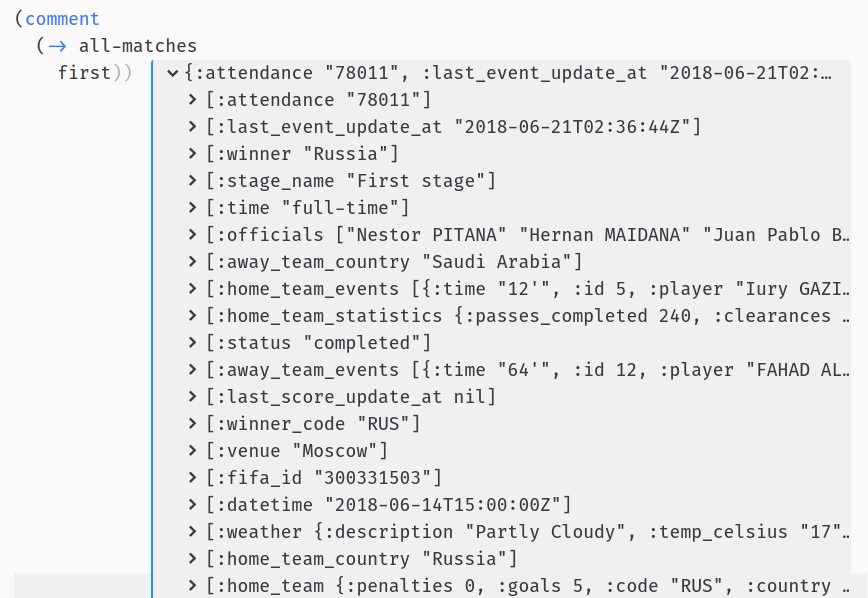
It’s a common practice to wrap interactive invocations into comment macro which makes them ignored when evaluating whole file at once.

Ok, so we have some basic attributes of the match, the number of goals for each team and some team events. Let’s investigate these:
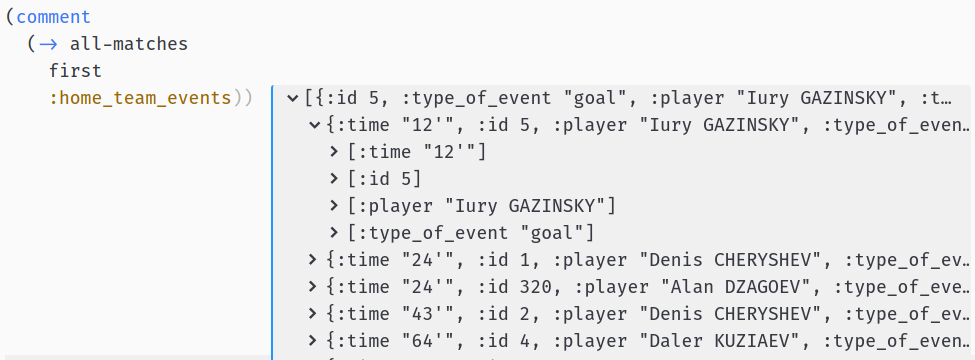
Looks promising — we have all the times of the goals scored by each team. Having this, our algorithm may look like this:

  1. Get times of goals for each team
  2. Sort goals by times
  3. Get the team with the first goal
  4. Check if the winner is the other team

Let’s start with filtering the goals from team’s events. First, we need to find how to filter goals from match events:
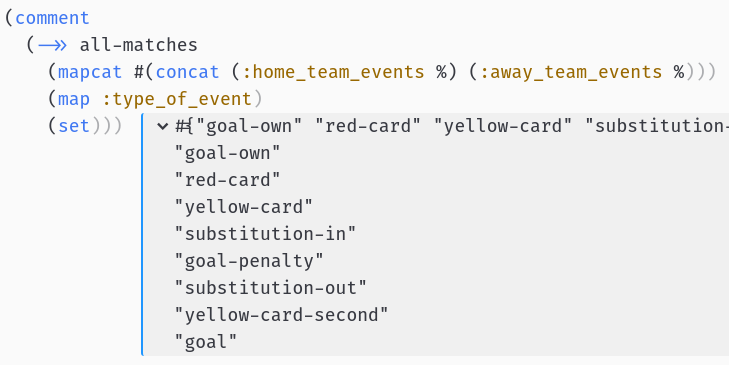
Ok, so we have goal, goal-penalty and goal-own:

defn goal? [e]
  (let [type (:type_of_event e)]
    (or (= "goal" type)
        (= "goal-penalty" type)
        (= "goal-own" type))))
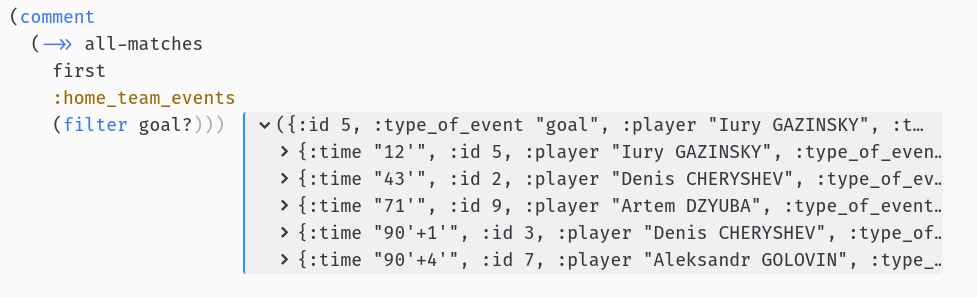
Looks good.

We’ll also need the time when the goal was scored and this is in a really strange format, e.g 90'+4'. We need to split on + character, remove ' and trim and then add additional time to get exact minute of the goal:

(require '[clojure.string :as string])

(defn goal-time [t]
  (->> 
    (string/split t #"\+")
    (map string/trim)
    (map #(string/replace % #"'" ""))
    (map #(Integer/parseInt %))
    (reduce +)))

EDIT:

Bartek Tartanus (thanks!) found a bug in just adding additional time to half time: suppose we had late goal in the first half and early goal in the second (45'+5' and 46) — my algorithm will pick second half goal as earlier. We need to somehow pass half (or part for extra-time) data to sort goal times. Fortunately, Clojure sorts collections of pairs well:

We need to calculate both half (part) and exact time of scoring a goal:

(defn part [goal]
  (let [time (first goal)]
    (cond
      (<= time 45) 1
      (<= time 90) 2
      (<= time 105) 3   
      (<= time 120) 4))) ;; parts 3 and 4 are for extra-time

(defn parts [time-str]
  (->>
    (string/split time-str #"\+")
    (map string/trim)
    (map #(string/replace % #"'" ""))
    (map #(Integer/parseInt %))))

(defn part-and-time [time-str]
  (let [parts (parts time-str)]
    [(part parts) (reduce + parts)]))

Now we can test improved sorting:
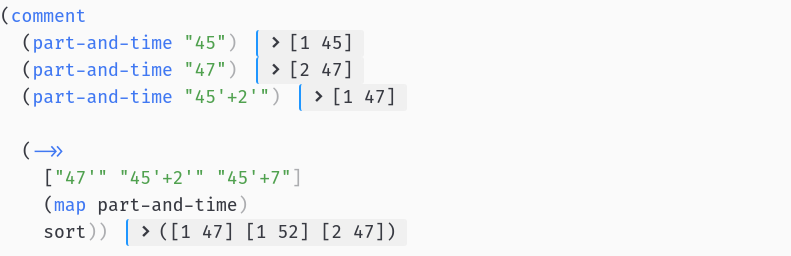
Seems to work! So let’s try to find a team that scored a first goal. My idea was to mix both :home and :away goal times in one collection:

([:home [1 38]] [:home [1 39]] [:away [1 28]])

and then sort by times:

([:away [1 28]] [:home [1 38]] [:home [1 39]])

to know the side that scored first goal (:away in this case).

(defn first-scored-side [match]
  (let [goal-times
          (concat
            (team-goal-times (:home_team_events match) :home)
            (team-goal-times (:away_team_events match) :away))]
   (->> goal-times (sort-by second) first first)))

I use first to get the first pair from sorted collection and then first again to get the first element from the pair:

To create a list with goal times and side I used this function:

(defn team-goal-times [events side]
  (->> events
    (filter goal?)
    (map :time)
    (map part-and-time)
    (map vector (repeat side))))

What’s happening in this last line? So, repeat returns an infinite lazy sequence with an element repeated and vector just creates an indexed collection from provided elements.
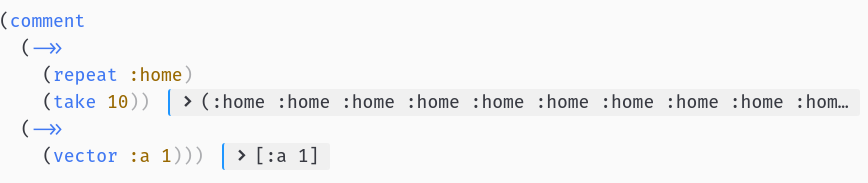
And map can also take two collections, applying provided function to pairs: <c1_first, c2_first>, <c1_second, c2_second>

Which leads us easily to this:

Ok, now we are ready write this come-back? function now:

(defn winner-side [match]
  (let [winner (:winner match)]
    (cond
      (= winner (:home_team_country match)) :home
      (= winner (:away_team_country match)) :away)))

(defn come-back? [match]
  (let [first-scored-side (first-scored-side match)
        winner-side (winner-side match)]
    (and (not (nil? winner-side))
         (not= winner-side first-scored-side))))

Let’s see if it works, just filter the team’s data from the match to remove noise:

(defn teams [match]
  (select-keys match [:home_team_country :away_team_country :winner]))
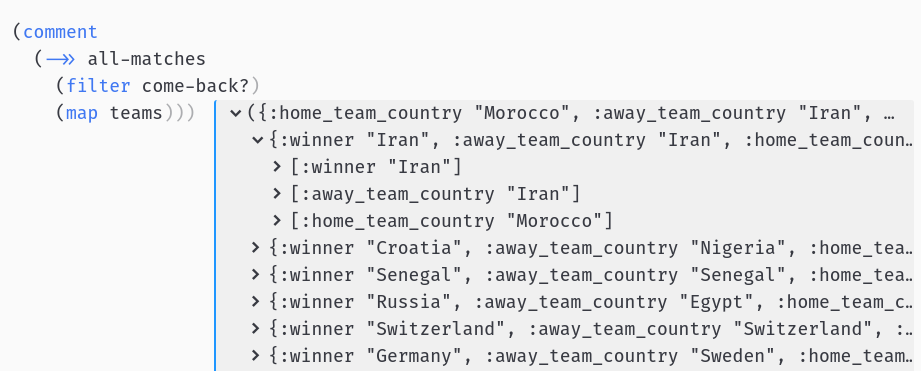
Ok, we got some results! But, hmm… Morocco — Iran?

0:1 with last-minute own goal? This definitely doesn’t look like come-back…. Let’s look at this match events:
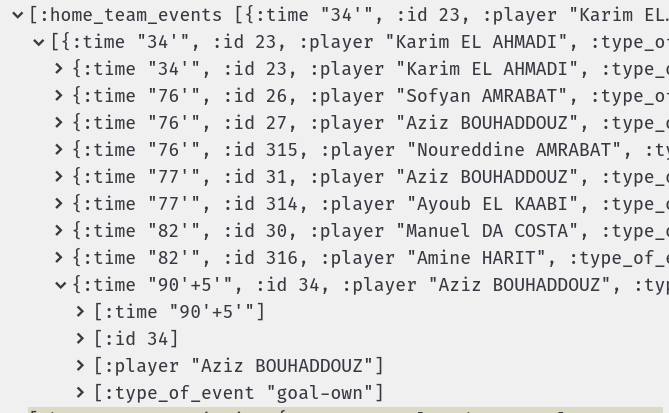
Ok, now I can see the problem. Own goals are contained in wrong side’s events! This goal should be in Iran’s events, otherwise our solution won’t work…

We can make a special case for own goals or just move own goals to correct side events. I decided to go with the second solution, knowing that Clojure is really good at transforming nested data structures e.g. with update and update-in functions:
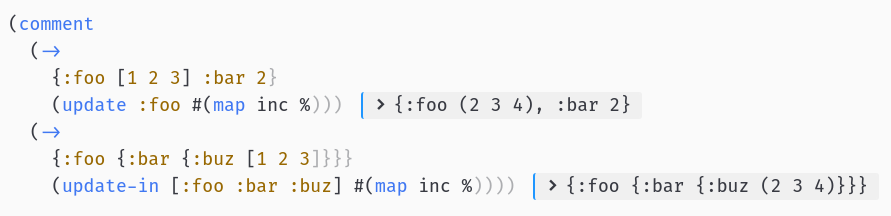
So, update takes a map, a key and a function and applies to value under that key, leaving rest of the map untouched. update-in works the same, but you can pass a whole path to some nested element in your data structure.

Let’s use update to move all the own-goals from :home_team_events to :away_team_events and vice-versa:

(defn own-goal? [event]
  (= "goal-own" (:type_of_event event)))

(defn own-goals [events]
  (->> events (filter own-goal?)))

(defn remove-own-goals [events]
  (remove own-goal? events))

(defn fix-match [match-to-fix]
  (let [own-home-goals (own-goals (:home_team_events match-to-fix))
        own-away-goals (own-goals (:away_team_events match-to-fix))]
   (-> match-to-fix
     (update :home_team_events remove-own-goals)
     (update :away_team_events remove-own-goals)
     (update :home_team_events concat own-away-goals)
     (update :away_team_events concat own-home-goals))))

And finally let’s fix come-back? function:

(defn come-back? [match-to-fix]
  (let [match (fix-match match-to-fix)
        first-scored-side (first-scored-side match)
        winner-side (winner-side match)]
    (and (not (nil? winner-side))
         (not= winner-side first-scored-side))))

Check the results again:
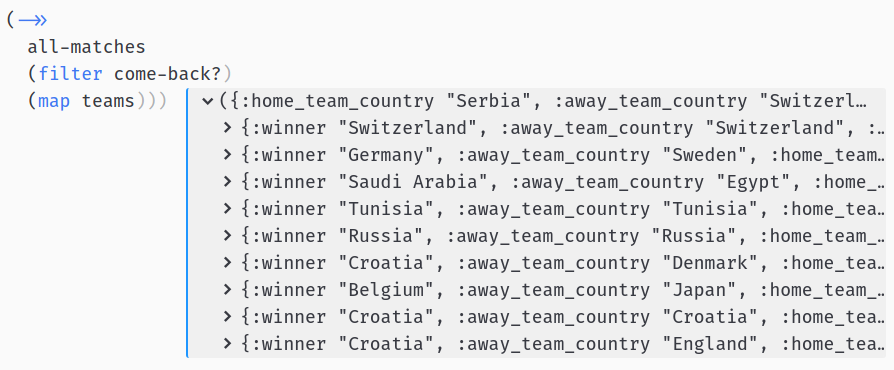
Yes, we have it! We found 9 such games, with overall leader Croatia coming back 3 times (2 by penalties).

You May Also Like

Clojure web development – state of the art

It’s now more than a year that I’m getting familiar with Clojure and the more I dive into it, the more it becomes the language. Once you defeat the “parentheses fear”, everything else just makes the difference: tooling, community, good engineering practices. So it’s now time for me to convince others. In this post I’ll try to walktrough a simple web application from scratch to show key tools and libraries used to develop with Clojure in late 2015.

Note for Clojurians: This material is rather elementary and may be useful for you if you already know Clojure a bit but never did anything bigger than hello world application.

Note for Java developers: This material shows how to replace Spring, Angular, grunt, live-reload with a bunch of Clojure tools and libraries and a bit of code.

The repo with final code and individual steps is here.

Bootstrap

I think all agreed that component is the industry standard for managing lifecycle of Clojure applications. If you are a Java developer you may think of it as a Spring (DI) replacement - you declare dependencies between “components” which are resolved on “system” startup. So you just say “my component needs a repository/database pool” and component library “injects” it for you.

To keep things simple I like to start with duct web app template. It’s a nice starter component application following the 12-factor philosophy. So let’s start with it:

lein new duct clojure-web-app +example

The +example parameter tells duct to create an example endpoint with HTTP routes - this would be helpful. To finish bootstraping run lein setup inside clojure-web-app directory.

Ok, let’s dive into the code. Component and injection related code should be in system.clj file:

(defn new-system [config]
  (let [config (meta-merge base-config config)]
    (-> (component/system-map
         :app  (handler-component (:app config))
         :http (jetty-server (:http config))
         :example (endpoint-component example-endpoint))
        (component/system-using
         {:http [:app]
          :app  [:example]
          :example []}))))

In the first section you instantiate components without dependencies, which are resolved in the second section. So in this example, “http” component (server) requires “app” (application abstraction), which in turn is injected with “example” (actual routes). If your component needs others, you just can get then by names (precisely: by Clojure keywords).

To start the system you must fire a REPL - interactive environment running within context of your application:

lein repl

After seeing prompt type (go). Application should start, you can visit http://localhost:3000 to see some example page.

A huge benefit of using component approach is that you get fully reloadable application. When you change literally anything - configuration, endpoints, implementation, you can just type (reset) in REPL and your application is up-to-date with the code. It’s a feature of the language, no JRebel, Spring-reloaded needed.

Adding REST endpoint

Ok, in the next step let’s add some basic REST endpoint returning JSON. We need to add 2 dependencies in project.clj file:

:dependencies
 ...
  [ring/ring-json "0.3.1"]
  [cheshire "5.1.1"]

Ring-json adds support for JSON for your routes (in ring it’s called middleware) and cheshire is Clojure JSON parser (like Jackson in Java). Modifying project dependencies if one of the few tasks that require restarting the REPL, so hit CTRL-C and type lein repl again.

To configure JSON middleware we have to add wrap-json-body and wrap-json-response just before wrap-defaults in system.clj:

(:require 
 ...
 [ring.middleware.json :refer [wrap-json-body wrap-json-response]])

(def base-config
   {:app {:middleware [[wrap-not-found :not-found]
                      [wrap-json-body {:keywords? true}]
                      [wrap-json-response]
                      [wrap-defaults :defaults]]

And finally, in endpoint/example.clj we must add some route with JSON response:

(:require 
 ...
 [ring.util.response :refer [response]]))

(defn example-endpoint [config]
  (routes
    (GET "/hello" [] (response {:hello "world"}))
    ...

Reload app with (reset) in REPL and test new route with curl:

curl -v http://localhost:3000/hello

< HTTP/1.1 200 OK
< Date: Tue, 15 Sep 2015 21:17:37 GMT
< Content-Type: application/json; charset=utf-8
< Set-Cookie: ring-session=37c337fb-6bbc-4e65-a060-1997718d03e0;Path=/;HttpOnly
< X-XSS-Protection: 1; mode=block
< X-Frame-Options: SAMEORIGIN
< X-Content-Type-Options: nosniff
< Content-Length: 151
* Server Jetty(9.2.10.v20150310) is not blacklisted
< Server: Jetty(9.2.10.v20150310)
<
* Connection #0 to host localhost left intact
{"hello": "world"}

It works! In case of any problems you can find working version in this commit.

Adding frontend with figwheel

Coding backend in Clojure is great, but what about the frontend? As you may already know, Clojure could be compiled not only to JVM bytecode, but also to Javascript. This may sound familiar if you used e.g. Coffescript. But ClojureScript philosophy is not only to provide some syntax sugar, but improve your development cycle with great tooling and fully interactive development. Let’s see how to achieve it.

The best way to introduce ClojureScript to a project is figweel. First let’s add fighweel plugin and configuration to project.clj:

:plugins
   ...
   [lein-figwheel "0.3.9"]

And cljsbuild configuration:

:cljsbuild
    {:builds [{:id "dev"
               :source-paths ["src-cljs"]
               :figwheel true
               :compiler {:main       "clojure-web-app.core"
                          :asset-path "js/out"
                          :output-to  "resources/public/js/clojure-web-app.js"
                          :output-dir "resources/public/js/out"}}]}

In short this tells ClojureScript compiler to take sources from src-cljs with figweel support and but resulting JavaScript into resources/public/js/clojure-web-app.js file. So we need to include this file in a simple HTML page:

<!DOCTYPE html>
<head>
</head>
<body>
  <div id="main">
  </div>
  <script src="js/clojure-web-app.js" type="text/javascript"></script>
</body>
</html>

To serve this static file we need to change some defaults and add corresponding route. In system.clj change api-defaults to site-defaults both in require section and base-config function. In example.clj add following route:

(GET "/" [] (io/resource "public/index.html")

Again (reset) in REPL window should reload everything.

But where is our ClojureScript source file? Let’s create file core.cljs in src-cljs/clojure-web-app directory:

(ns ^:figwheel-always clojure-web-app.core)

(enable-console-print!)

(println "hello from clojurescript")

Open another terminal and run lein fighweel. It should compile ClojureScript and print ‘Prompt will show when figwheel connects to your application’. Open http://localhost:3000. Fighweel window should prompt:

To quit, type: :cljs/quit
cljs.user=>

Type (js/alert "hello"). Boom! If everything worked you should see and alert in your browser. Open developers console in your browser. You should see hello from clojurescript printed on the console. Change it in core.cljs to (println "fighweel rocks") and save the file. Without reloading the page your should see updated message. Figweel rocks! Again, in case of any problems, refer to this commit.

In the next post I’ll show how to fetch data from MongoDB, serve it with REST to the broser and write ReactJs/Om components to render it. Stay tuned!

Devoxx 2012 review


I'm sitting in a train to Charleroi, looking through a window at the Denmark landscape, street lights flashing by, people comming home from work, getting out for a Friday night party, or having a family dinner. To my left, guys from SoftwareMill are playing cards.
I don't really see them. My mind is busy elsewhere, sorting out and processing last two days in Antwerp, where 3400 developers, from 41 different countries, listened to 200 different sessions at the Devoxx, AFAIK the biggest Java conference this year.