BigDecimal and Locale in Grails

I was recently puzzled by strange behaviour of Grails application with web service interface. It resulted with rounding currency amount values when I sent request from my browser but it worked perfectly if another client application sent same…

I was recently puzzled by strange behaviour of Grails application with web service interface. It resulted with rounding currency amount values when I sent request from my browser but it worked perfectly if another client application sent same request. After investigation it turned out that the HTTP requests were not exactly identical. The browser request contained header entry with Polish locale pl-PL for which coma is a decimal separator.

Request
http://localhost:8080/helloworld/amount/displayAmount?amount=12.22

Header
Accept-Language: pl-PL,pl;q=0.8,en-US;q=0.6,en;q=0.4

In order to reproduce this behaviour I created a simple Grails 2.1 HelloWorld app.

AccountController.groovy

package helloworld

class AmountController {

    def displayAmount(PaymentData paymentData) {
        render "Hello, this is your amount: " + paymentData.amount.toString()
    }
}

PaymentData.groovy:

    package helloworld

import grails.validation.Validateable

@Validateable
class PaymentData {
    BigDecimal amount

    static constraints = {
        amount(nullable: false, min: BigDecimal.ZERO, scale: 2)
    }
}


Starting this app we can observe rounding of cents in amount to 00 when sending request with dot in amount (http://localhost:8080/helloworld/amount/displayAmount?amount=12.22)
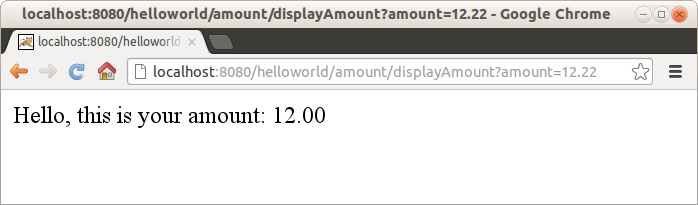

Whereas for amount with coma it gives a result with valid cent part (http://localhost:8080/helloworld/amount/displayAmount?amount=12,22)


Same behaviour might be expected in case of other locales that use coma as decimal separator, e.g. de_DE. Very not an obvious feature.

You May Also Like

[:en] Operational problems with Zookeeper

This post is a summary of what has been presented by Kathleen Ting on StrangeLoop conference. You can watch the original here: http://www.infoq.com/presentations/Misconfiguration-ZooKeeper I've decided to put this selection here for quick reference. ...This post is a summary of what has been presented by Kathleen Ting on StrangeLoop conference. You can watch the original here: http://www.infoq.com/presentations/Misconfiguration-ZooKeeper I've decided to put this selection here for quick reference. ...

Spock, Java and Maven

Few months ago I've came across Groovy - powerful language for JVM platform which combines the power of Java with abilities typical for scripting languages (dynamic typing, metaprogramming).

Together with Groovy I've discovered spock framework (https://code.google.com/p/spock/) - specification framework for Groovy (of course you can test Java classes too!). But spock is not only test/specification framework - it also contains powerful mocking tools.

Even though spock is dedicated for Groovy there is no problem with using it for Java classes tests. In this post I'm going to describe how to configure Maven project to build and run spock specifications together with traditional JUnit tests.


Firstly, we need to prepare pom.xml and add necessary dependencies and plugins.

Two obligatory libraries are:
<dependency>
<groupid>org.spockframework</groupId>
<artifactid>spock-core</artifactId>
<version>0.7-groovy-2.0</version>
<scope>test</scope>
</dependency>
<dependency>
<groupid>org.codehaus.groovy</groupId>
<artifactid>groovy-all</artifactId>
<version>${groovy.version}</version>
<scope>test</scope>
</dependency>
Where groovy.version is property defined in pom.xml for more convenient use and easy version change, just like this:
<properties>
<gmaven-plugin.version>1.4</gmaven-plugin.version>
<groovy.version>2.1.5</groovy.version>
</properties>

I've added property for gmaven-plugin version for the same reason ;)

Besides these two dependencies, we can use few additional ones providing extra functionality:
  • cglib - for class mocking
  • objenesis - enables mocking classes without default constructor
To add them to the project put these lines in <dependencies> section of pom.xml:
<dependency>
<groupid>cglib</groupId>
<artifactid>cglib-nodep</artifactId>
<version>3.0</version>
<scope>test</scope>
</dependency>
<dependency>
<groupid>org.objenesis</groupId>
<artifactid>objenesis</artifactId>
<version>1.3</version>
<scope>test</scope>
</dependency>

And that's all for dependencies section. Now we will focus on plugins necessary to compile Groovy classes. We need to add gmaven-plugin with gmaven-runtime-2.0 dependency in plugins section:
<plugin>
<groupid>org.codehaus.gmaven</groupId>
<artifactid>gmaven-plugin</artifactId>
<version>${gmaven-plugin.version}</version>
<configuration>
<providerselection>2.0</providerSelection>
</configuration>
<executions>
<execution>
<goals>
<goal>compile</goal>
<goal>testCompile</goal>
</goals>
</execution>
</executions>
<dependencies>
<dependency>
<groupid>org.codehaus.gmaven.runtime</groupId>
<artifactid>gmaven-runtime-2.0</artifactId>
<version>${gmaven-plugin.version}</version>
<exclusions>
<exclusion>
<groupid>org.codehaus.groovy</groupId>
<artifactid>groovy-all</artifactId>
</exclusion>
</exclusions>
</dependency>
<dependency>
<groupid>org.codehaus.groovy</groupId>
<artifactid>groovy-all</artifactId>
<version>${groovy.version}</version>
</dependency>
</dependencies>
</plugin>

With these configuration we can use spock and write our first specifications. But there is one issue: default settings for maven-surefire plugin demand that test classes must end with "..Test" postfix, which is ok when we want to use such naming scheme for our spock tests. But if we want to name them like CommentSpec.groovy or whatever with "..Spec" ending (what in my opinion is much more readable) we need to make little change in surefire plugin configuration:
<plugin>
<groupid>org.apache.maven.plugins</groupId>
<artifactid>maven-surefire-plugin</artifactId>
<version>2.15</version>
<configuration>
<includes>
<include>**/*Test.java</include>
<include>**/*Spec.java</include>
</includes>
</configuration>
</plugin>

As you can see there is a little trick ;) We add include directive for standard Java JUnit test ending with "..Test" postfix, but there is also an entry for spock test ending with "..Spec". And there is a trick: we must write "**/*Spec.java", not "**/*Spec.groovy", otherwise Maven will not run spock tests (which is strange and I've spent some time to figure out why Maven can't run my specs).

Little update: instead of "*.java" postfix for both types of tests we can write "*.class" what is in my opinion more readable and clean:
<include>**/*Test.class</include>
<include>**/*Spec.class</include>
(thanks to Tomek Pęksa for pointing this out!)

With such configuration, we can write either traditional JUnit test and put them in src/test/java directory or groovy spock specifications and place them in src/test/groovy. And both will work together just fine :) In one of my next posts I'll write something about using spock and its mocking abilities in practice, so stay in tune.