micro-burn has Trello integration

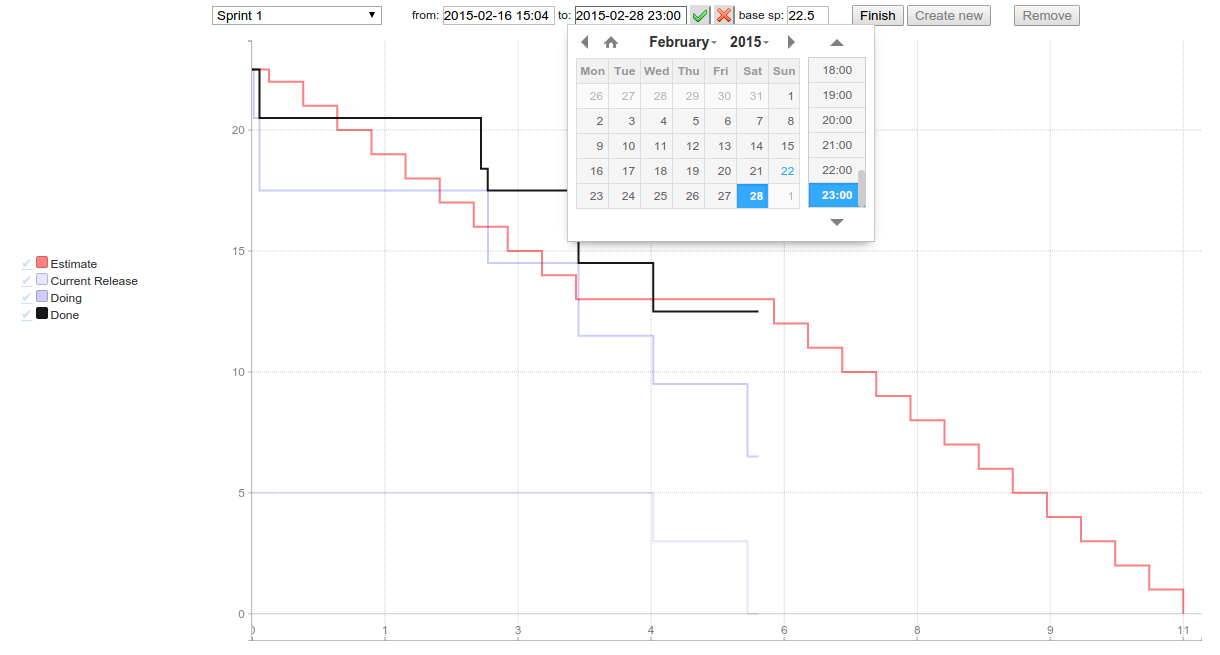
After a few long evenings I’ve finally integrated micro-burn with Trello. All you need to run it for your Trello board is to write short configuration and run fat jar. It renders burndown chart visualising progress of cards on your board.You can specif…After a few long evenings I’ve finally integrated micro-burn with Trello. All you need to run it for your Trello board is to write short configuration and run fat jar. It renders burndown chart visualising progress of cards on your board.

After a few long evenings I’ve finally integrated micro-burn with Trello. All you need to run it for your Trello board is to write short configuration and run fat jar. It renders burndown chart visualising progress of cards on your board.

You can specify story points adding them in curly braces inside card title, use Scrum for Trello browser extension or define default story points number for user stories. Completed checklist items are treated as a part of work done inside card. You can manage sprints on your own: creating new, specifying start/end/name, finishing or turn on full automatic mode: sprints will be created periodically.

Sprint management in usage:
You May Also Like

Open IMS Core Mr interface

Open IMS Core does’t have standard way to define connection to MRF (Media Resource Function) on Mr interface.In IMS Mr interface is based on SIP and is similar to ISC used by Application Server (AS). Because of that we can define MRF as IMS AS and just add Wildcard PSI that has trigger on that AS. That [...]

Spock, Java and Maven

Few months ago I've came across Groovy - powerful language for JVM platform which combines the power of Java with abilities typical for scripting languages (dynamic typing, metaprogramming).

Together with Groovy I've discovered spock framework (https://code.google.com/p/spock/) - specification framework for Groovy (of course you can test Java classes too!). But spock is not only test/specification framework - it also contains powerful mocking tools.

Even though spock is dedicated for Groovy there is no problem with using it for Java classes tests. In this post I'm going to describe how to configure Maven project to build and run spock specifications together with traditional JUnit tests.


Firstly, we need to prepare pom.xml and add necessary dependencies and plugins.

Two obligatory libraries are:
<dependency>
<groupid>org.spockframework</groupId>
<artifactid>spock-core</artifactId>
<version>0.7-groovy-2.0</version>
<scope>test</scope>
</dependency>
<dependency>
<groupid>org.codehaus.groovy</groupId>
<artifactid>groovy-all</artifactId>
<version>${groovy.version}</version>
<scope>test</scope>
</dependency>
Where groovy.version is property defined in pom.xml for more convenient use and easy version change, just like this:
<properties>
<gmaven-plugin.version>1.4</gmaven-plugin.version>
<groovy.version>2.1.5</groovy.version>
</properties>

I've added property for gmaven-plugin version for the same reason ;)

Besides these two dependencies, we can use few additional ones providing extra functionality:
  • cglib - for class mocking
  • objenesis - enables mocking classes without default constructor
To add them to the project put these lines in <dependencies> section of pom.xml:
<dependency>
<groupid>cglib</groupId>
<artifactid>cglib-nodep</artifactId>
<version>3.0</version>
<scope>test</scope>
</dependency>
<dependency>
<groupid>org.objenesis</groupId>
<artifactid>objenesis</artifactId>
<version>1.3</version>
<scope>test</scope>
</dependency>

And that's all for dependencies section. Now we will focus on plugins necessary to compile Groovy classes. We need to add gmaven-plugin with gmaven-runtime-2.0 dependency in plugins section:
<plugin>
<groupid>org.codehaus.gmaven</groupId>
<artifactid>gmaven-plugin</artifactId>
<version>${gmaven-plugin.version}</version>
<configuration>
<providerselection>2.0</providerSelection>
</configuration>
<executions>
<execution>
<goals>
<goal>compile</goal>
<goal>testCompile</goal>
</goals>
</execution>
</executions>
<dependencies>
<dependency>
<groupid>org.codehaus.gmaven.runtime</groupId>
<artifactid>gmaven-runtime-2.0</artifactId>
<version>${gmaven-plugin.version}</version>
<exclusions>
<exclusion>
<groupid>org.codehaus.groovy</groupId>
<artifactid>groovy-all</artifactId>
</exclusion>
</exclusions>
</dependency>
<dependency>
<groupid>org.codehaus.groovy</groupId>
<artifactid>groovy-all</artifactId>
<version>${groovy.version}</version>
</dependency>
</dependencies>
</plugin>

With these configuration we can use spock and write our first specifications. But there is one issue: default settings for maven-surefire plugin demand that test classes must end with "..Test" postfix, which is ok when we want to use such naming scheme for our spock tests. But if we want to name them like CommentSpec.groovy or whatever with "..Spec" ending (what in my opinion is much more readable) we need to make little change in surefire plugin configuration:
<plugin>
<groupid>org.apache.maven.plugins</groupId>
<artifactid>maven-surefire-plugin</artifactId>
<version>2.15</version>
<configuration>
<includes>
<include>**/*Test.java</include>
<include>**/*Spec.java</include>
</includes>
</configuration>
</plugin>

As you can see there is a little trick ;) We add include directive for standard Java JUnit test ending with "..Test" postfix, but there is also an entry for spock test ending with "..Spec". And there is a trick: we must write "**/*Spec.java", not "**/*Spec.groovy", otherwise Maven will not run spock tests (which is strange and I've spent some time to figure out why Maven can't run my specs).

Little update: instead of "*.java" postfix for both types of tests we can write "*.class" what is in my opinion more readable and clean:
<include>**/*Test.class</include>
<include>**/*Spec.class</include>
(thanks to Tomek Pęksa for pointing this out!)

With such configuration, we can write either traditional JUnit test and put them in src/test/java directory or groovy spock specifications and place them in src/test/groovy. And both will work together just fine :) In one of my next posts I'll write something about using spock and its mocking abilities in practice, so stay in tune.