Sonar Gerrit Plugin Release

I am happy to announce a first release of my Sonar Gerrit plugin. This plugin reports Sonar violations on your patchsets to your Gerrit server. Sonar analyses full project, but only files included in patchset are commented on Gerrit. Please forward to project page for installation instructions. This plugin is intended to use with Gerrit Trigger plugin for Jenkins CI server. Together they provide a great tool for automatic static code analysis.I am happy to announce a first release of my Sonar Gerrit plugin. This plugin reports Sonar violations on your patchsets to your Gerrit server. Sonar analyses full project, but only files included in patchset are commented on Gerrit. Please forward to project page for installation instructions. This plugin is intended to use with Gerrit Trigger plugin for Jenkins CI server. Together they provide a great tool for automatic static code analysis.

Initial release

I am happy to announce a first release of my Sonar Gerrit plugin. This plugin reports Sonar violations on your patchsets to your Gerrit server. Sonar analyses full project, but only files included in patchset are commented on Gerrit. Please forward to project page for installation instructions.

This plugin is intended to use with Gerrit Trigger plugin for Jenkins CI server. Together they provide a great tool for automatic static code analysis.

How does it work?

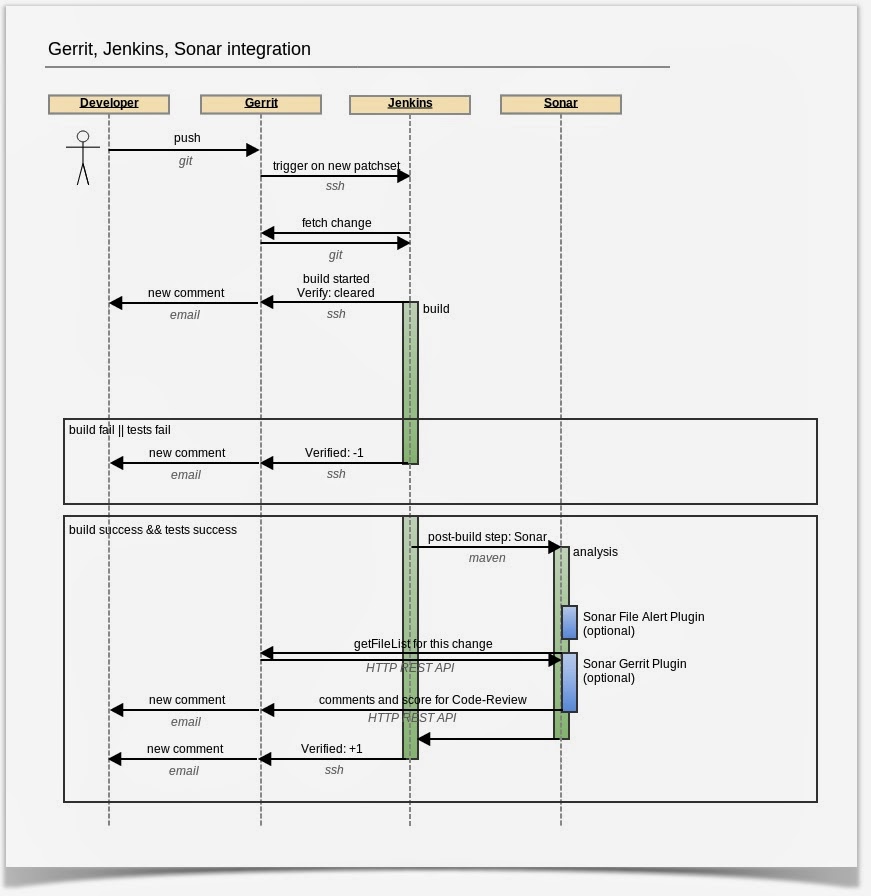
At the moment you push a patchset to Gerrit, Jenkins is notified with a ssh event. It fetches a code with a patchset and it builds your changes. It quits when build or tests fail.

But if it succeeds, Sonar analase your project in a post-build action. This is a place where my Sonar Gerrit plugin shines. It asks Gerrit for changed files before analysis and after Sonar analysis is finished, plugin reports comments on these files as a Gerrit reviewer. Currently plugin always reports +1 for Code Review, as it’s still in development. However, you should always treat these comments as hints to improve, not as direct errors.
Extras

I’ve released also a second plugin: Sonar File Alerts plugin. This plugin raises alerts on file level in Sonar. It extends default behaviour, which raises alerts only at root project level. It is useful when you create alert rules in Sonar like "Code Coverage < 60". Each file is checked against this rule!

If you use Sonar File Alerts plugin and an alert will be generated on some file, then a comment will be published on this file on Gerrit.

Feedback

Please provide a feedback on these plugins. Feel free to submit issues on github or comment. It’s still an early stage so your input is very welcome!

You May Also Like

Spock, Java and Maven

Few months ago I've came across Groovy - powerful language for JVM platform which combines the power of Java with abilities typical for scripting languages (dynamic typing, metaprogramming).

Together with Groovy I've discovered spock framework (https://code.google.com/p/spock/) - specification framework for Groovy (of course you can test Java classes too!). But spock is not only test/specification framework - it also contains powerful mocking tools.

Even though spock is dedicated for Groovy there is no problem with using it for Java classes tests. In this post I'm going to describe how to configure Maven project to build and run spock specifications together with traditional JUnit tests.


Firstly, we need to prepare pom.xml and add necessary dependencies and plugins.

Two obligatory libraries are:
<dependency>
<groupid>org.spockframework</groupId>
<artifactid>spock-core</artifactId>
<version>0.7-groovy-2.0</version>
<scope>test</scope>
</dependency>
<dependency>
<groupid>org.codehaus.groovy</groupId>
<artifactid>groovy-all</artifactId>
<version>${groovy.version}</version>
<scope>test</scope>
</dependency>
Where groovy.version is property defined in pom.xml for more convenient use and easy version change, just like this:
<properties>
<gmaven-plugin.version>1.4</gmaven-plugin.version>
<groovy.version>2.1.5</groovy.version>
</properties>

I've added property for gmaven-plugin version for the same reason ;)

Besides these two dependencies, we can use few additional ones providing extra functionality:
  • cglib - for class mocking
  • objenesis - enables mocking classes without default constructor
To add them to the project put these lines in <dependencies> section of pom.xml:
<dependency>
<groupid>cglib</groupId>
<artifactid>cglib-nodep</artifactId>
<version>3.0</version>
<scope>test</scope>
</dependency>
<dependency>
<groupid>org.objenesis</groupId>
<artifactid>objenesis</artifactId>
<version>1.3</version>
<scope>test</scope>
</dependency>

And that's all for dependencies section. Now we will focus on plugins necessary to compile Groovy classes. We need to add gmaven-plugin with gmaven-runtime-2.0 dependency in plugins section:
<plugin>
<groupid>org.codehaus.gmaven</groupId>
<artifactid>gmaven-plugin</artifactId>
<version>${gmaven-plugin.version}</version>
<configuration>
<providerselection>2.0</providerSelection>
</configuration>
<executions>
<execution>
<goals>
<goal>compile</goal>
<goal>testCompile</goal>
</goals>
</execution>
</executions>
<dependencies>
<dependency>
<groupid>org.codehaus.gmaven.runtime</groupId>
<artifactid>gmaven-runtime-2.0</artifactId>
<version>${gmaven-plugin.version}</version>
<exclusions>
<exclusion>
<groupid>org.codehaus.groovy</groupId>
<artifactid>groovy-all</artifactId>
</exclusion>
</exclusions>
</dependency>
<dependency>
<groupid>org.codehaus.groovy</groupId>
<artifactid>groovy-all</artifactId>
<version>${groovy.version}</version>
</dependency>
</dependencies>
</plugin>

With these configuration we can use spock and write our first specifications. But there is one issue: default settings for maven-surefire plugin demand that test classes must end with "..Test" postfix, which is ok when we want to use such naming scheme for our spock tests. But if we want to name them like CommentSpec.groovy or whatever with "..Spec" ending (what in my opinion is much more readable) we need to make little change in surefire plugin configuration:
<plugin>
<groupid>org.apache.maven.plugins</groupId>
<artifactid>maven-surefire-plugin</artifactId>
<version>2.15</version>
<configuration>
<includes>
<include>**/*Test.java</include>
<include>**/*Spec.java</include>
</includes>
</configuration>
</plugin>

As you can see there is a little trick ;) We add include directive for standard Java JUnit test ending with "..Test" postfix, but there is also an entry for spock test ending with "..Spec". And there is a trick: we must write "**/*Spec.java", not "**/*Spec.groovy", otherwise Maven will not run spock tests (which is strange and I've spent some time to figure out why Maven can't run my specs).

Little update: instead of "*.java" postfix for both types of tests we can write "*.class" what is in my opinion more readable and clean:
<include>**/*Test.class</include>
<include>**/*Spec.class</include>
(thanks to Tomek Pęksa for pointing this out!)

With such configuration, we can write either traditional JUnit test and put them in src/test/java directory or groovy spock specifications and place them in src/test/groovy. And both will work together just fine :) In one of my next posts I'll write something about using spock and its mocking abilities in practice, so stay in tune.