I need a new rule
In our project we use  (formely Sonar) to manage our code quality. It is a great tool and I recommend everyone to set it up and read its reports.
Recently, we’ve agreed that it’s better to use assertj assertions in our unit tests than JUnit’s. So I’ve decided to write a simple rule that checks if some of JUnit asserts assertTrue, assertFalse, assertNull and others are used. Then, I’ve discovered it’s not so easy to do it with Sonar:
- only 10 code quality rules are applied to unit tests – they are in special repository PMD Unit Tests (source)
- these 10 rules are disabled by default, you have to enable them by hand
- you cannot add new rules to this group
However, it turned out it is doable with a small tricks.
Custom PMD Unit Tests rule tutorial
Create your XPath expression by following this tutorial on how to create custom PMD rule. There is a visual editor to test your rules as you develop them – that’s great. My XPath expression to avoid all JUnit assertions looks like this:
//PrimaryPrefix/Name[@Image='assertEquals' or @Image='assertNull' or @Image='assertNotNull' or @Image='assertSame' or @Image='assertNotSame' or @Image='assertArrayEquals' or @Image='assertTrue' or @Image='assertFalse']
Go to your Sonar installation, log in as an Administrator, head to Quality Profiles and select a profile that you use. Search for “xpath” and change Activation to Any. You should see two results like this:

Expand XPath rule template (dont’ worry that it says it’s deprecated) and then click Copy rule. Fill a form with message and XPath and save it. Then take a look at the bottom – you need an identifier of this rule:
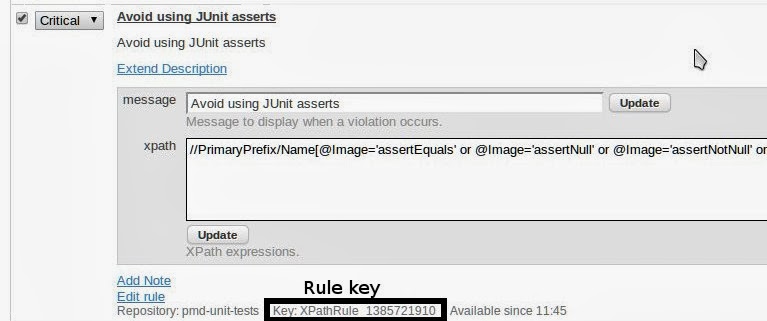
You have created a PMD rule, now you need to move it to PMD Unit Tests group. Connect to Sonar’s MySQL database. Search for your rule by key:
mysql> select id, plugin_rule_key, plugin_name, parent_id, status from rules where plugin_rule_key='XPathRule_1385721910';
+-----+----------------------+----------------+-----------+-------------+
| id  | plugin_rule_key      | plugin_name    | parent_id | status      |
+-----+----------------------+----------------+-----------+-------------+
| 903 | XPathRule_1385721910 | pmd            | NULL      | DEPRECATED  |
+-----+----------------------+----------------+-----------+-------------+
1 row in set (0.00 sec)
Update plugin_name and status (remember to use appropiate primary key for id column):
mysql> update rules set plugin_name='pmd-unit-tests', status='READY' where id=903;
Query OK, 1 row affected (0.00 sec)
Rows matched: 1 Changed: 1 Warnings: 0
There is one step left. Sonar will change this rule’s status to REMOVED on restart due to his boot checks. You need to trick him and change parent_id to other’s PMD Unit Tests rule. List all these rules and choose one’s identifier.
mysql> select id, plugin_name, status from rules where plugin_name='pmd-unit-tests';
+-----+----------------+---------+
| id  | plugin_name    | status  |
+-----+----------------+---------+
| 775 | pmd-unit-tests | READY   |
| 776 | pmd-unit-tests | READY   |
| 777 | pmd-unit-tests | READY   |
| 778 | pmd-unit-tests | READY   |
| 779 | pmd-unit-tests | READY   |
| 780 | pmd-unit-tests | READY   |
| 781 | pmd-unit-tests | READY   |
| 782 | pmd-unit-tests | READY   |
| 783 | pmd-unit-tests | READY   |
| 784 | pmd-unit-tests | READY   |
| 903 | pmd-unit-tests | READY   |
+-----+----------------+---------+
11 rows in set (0.00 sec)\
Choose any id you like, let’s say 775 and apply it as parent_id to your newly created rule:
mysql> update rules set parent_id=775 where id=903;
Query OK, 1 row affected (0.00 sec)
Rows matched: 1 Changed: 1 Warnings: 0
Go to your Quality profile and make sure your rule is active! Check it twice, it’s easy to forget that step. It’s all set up, enjoy your analysis!
