Idiomatic Peeking with Java Stream API

The peek() method from the Java Stream API is often misunderstood. Let’s try to clarify how it works and when should be used.

Stream


Introduction

Let’s start responsibly by RTFM inspecting peek()’s user’s manual.

Returns a stream consisting of the elements of this stream, additionally performing the provided action on each element as elements are consumed from the resulting stream.
Sounds pretty straightforward. We can use it for applying side-effects for every consumed Stream element:

Stream.of("one", "two", "three")
  .peek(e -> System.out.println(e + " was consumed by peek()."))
  .collect(Collectors.toList());

The result of such operation is not surprising:

one was consumed by peek().
two was consumed by peek().
three was consumed by peek().

Stream/peek Lazy Evaluation

but… what will happen if we replace the terminal collect() operation with a forEach()?

Stream.of("one", "two", "three")
  .peek(e -> System.out.println(e + " was consumed by peek()."))
  .forEach(System.out::println);

It might be tempting to think that we’ll see a series of peek() logs followed by a series of for-each logs but this is not the case:

one was consumed by peek().
one
two was consumed by peek().
two
three was consumed by peek().
three

It gets even more interesting if we get rid of the forEach call:

Stream.of("one", "two", "three")
  .peek(e -> System.out.println(e + " was consumed by peek()."));

the result would be nothing:


As JavaDoc states:

Intermediate operations return a new stream. They are always lazy; executing an intermediate operation such as filter() does not actually perform any filtering, but instead creates a new stream that, when traversed, contains the elements of the initial stream that match the given predicate. Traversal of the pipeline source does not begin until the terminal operation of the pipeline is executed.
So, because of the lazy evaluation Stream pipelines are always being traversed “vertically” and not “horizontally” which allows to avoid doing unnecessary calculations. Additionally, the traversal is triggered only when a terminal method is present. Hence, the observed behaviour.

This is why it’s possible to represent and manipulate infinite sequences using Streams. (Because where do you store an infinite sequence? In the cloud?):

Stream.iterate(0, i -> i + 1)
  .peek(System.out::println)
  .findFirst();

The above operation completes almost immediately because of the lazy character of Stream traversal. Of course, if you try to collect the whole infinite sequence to some data structure, even laziness will not save you.

So, we can see that peek() can’t be treated as an intermediate for-each replacement because it invokes the passed Consumer only on elements that are visited by the Stream.

Unfortunately, Streams do not always behave entirely lazily.

Proper Usage

Further inspection of the official docs reveals a note:

This method exists mainly to support debugging, where you want to see the elements as they flow past a certain point in a pipeline
The point of confusion is the “mainly” word. Let’s have a peek(pun intended) at the English dictionary:
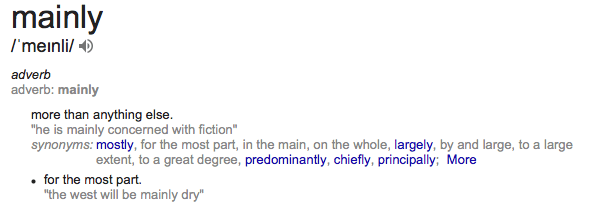
We can see that non-debugging usages are not forbidden nor discouraged.

So, technically, we should be able to, e.g., modify the Stream elements on the fly which would not be possible in the immutable, functional world. Let’s use the infamous mutable java.util.Date:

Stream.of(Date.from(Instant.EPOCH))
  .peek(d -> d.setTime(Long.MAX_VALUE))
  .forEach(System.out::println);

// Sun Aug 17 08:12:55 CET 292278994

and we can observe that the result is far away from the standard epoch, which means the mutating operation was indeed applied.

The problem is that this behaviour is highly deceiving because certain Stream implementations can optimize out peek() calls.

This gets clarified in the early draft of JDK 9’s docs eventually:

In cases where the stream implementation is able to optimize away the production of some or all the elements (such as with short-circuiting operations like findFirst, or in the example described in count()), the action will not be invoked for those elements. (…) An implementation may choose to not execute the stream pipeline (either sequentially or in parallel) if it is capable of computing the count directly from the stream source.
So, now it’s clear that it might not be the best choice if we want to perform some side effects deterministically.

According to this, peek() might not be even that reliable debugging tool after all.

Key Takeaways

  • The peek() method works fine as a debugging tool when we want to see what is being consumed by a Stream
  • It seems to work fine when applying mutating operations but should not be used this way because this behaviour is non-deterministic due to the possibility of certain peek() calls being omitted due to internal optimization
  • The discussion, whether mutation operations should be allowed or not, would never take place if we were restricted to operate only on immutable values
  • We have around 292276977 years before we run out of java.util.Date range
You May Also Like

Using WsLite in practice

TL;DR

There is a example working GitHub project which covers unit testing and request/response logging when using WsLite.

Why Groovy WsLite ?

I’m a huge fan of Groovy WsLite project for calling SOAP web services. Yes, in a real world you have to deal with those - big companies have huge amount of “legacy” code and are crazy about homogeneous architecture - only SOAP, Java, Oracle, AIX…

But I also never been comfortable with XFire/CXF approach of web service client code generation. I wrote a bit about other posibilites in this post. With JAXB you can also experience some freaky classloading errors - as Tomek described on his blog. In a large commercial project the “the less code the better” principle is significant. And the code generated from XSD could look kinda ugly - especially more complicated structures like sequences, choices, anys etc.

Using WsLite with native Groovy concepts like XmlSlurper could be a great choice. But since it’s a dynamic approach you have to be really careful - write good unit tests and log requests. Below are my few hints for using WsLite in practice.

Unit testing

Suppose you have some invocation of WsLite SOAPClient (original WsLite example):

def getMothersDay(long _year) {
    def response = client.send(SOAPAction: action) {
       body {
           GetMothersDay('xmlns':'http://www.27seconds.com/Holidays/US/Dates/') {
              year(_year)
           }
       }
    }
    response.GetMothersDayResponse.GetMothersDayResult.text()
}

How can the unit test like? My suggestion is to mock SOAPClient and write a simple helper to test that builded XML is correct. Example using great SpockFramework:

void setup() {
   client = Mock(SOAPClient)
   service.client = client
}

def "should pass year to GetMothersDay and return date"() {
  given:
      def year = 2013
  when:
      def date = service.getMothersDay(year)
  then:
      1 * client.send(_, _) >> { Map params, Closure requestBuilder ->
            Document doc = buildAndParseXml(requestBuilder)
            assertXpathEvaluatesTo("$year", '//ns:GetMothersDay/ns:year', doc)
            return mockResponse(Responses.mothersDay)
      }
      date == "2013-05-12T00:00:00"
}

This uses a real cool feature of Spock - even when you mock the invocation with “any mark” (_), you are able to get actual arguments. So we can build XML that would be passed to SOAPClient's send method and check that specific XPaths are correct:

void setup() {
    engine = XMLUnit.newXpathEngine()
    engine.setNamespaceContext(new SimpleNamespaceContext(namespaces()))
}

protected Document buildAndParseXml(Closure xmlBuilder) {
    def writer = new StringWriter()
    def builder = new MarkupBuilder(writer)
    builder.xml(xmlBuilder)
    return XMLUnit.buildControlDocument(writer.toString())
}

protected void assertXpathEvaluatesTo(String expectedValue,
                                      String xpathExpression, Document doc) throws XpathException {
    Assert.assertEquals(expectedValue,
            engine.evaluate(xpathExpression, doc))
}

protected Map namespaces() {
    return [ns: 'http://www.27seconds.com/Holidays/US/Dates/']
}

The XMLUnit library is used just for XpathEngine, but it is much more powerful for comparing XML documents. The NamespaceContext is needed to use correct prefixes (e.g. ns:GetMothersDay) in your Xpath expressions.

Finally - the mock returns SOAPResponse instance filled with envelope parsed from some constant XML:

protected SOAPResponse mockResponse(String resp) {
    def envelope = new XmlSlurper().parseText(resp)
    new SOAPResponse(envelope: envelope)
}

Request and response logging

The WsLite itself doesn’t use any logging framework. We usually handle it by adding own sendWithLogging method:

private SOAPResponse sendWithLogging(String action, Closure cl) {
    SOAPResponse response = client.send(SOAPAction: action, cl)
    log(response?.httpRequest, response?.httpResponse)
    return response
}

private void log(HTTPRequest request, HTTPResponse response) {
    log.debug("HTTPRequest $request with content:\n${request?.contentAsString}")
    log.debug("HTTPResponse $response with content:\n${response?.contentAsString}")
}

This logs the actual request and response send through SOAPClient. But it logs only when invocation is successful and errors are much more interesting… So here goes withExceptionHandler method:

private SOAPResponse withExceptionHandler(Closure cl) {
    try {
        cl.call()
    } catch (SOAPFaultException soapEx) {
        log(soapEx.httpRequest, soapEx.httpResponse)
        def message = soapEx.hasFault() ? soapEx.fault.text() : soapEx.message
        throw new InfrastructureException(message)
    } catch (HTTPClientException httpEx) {
        log(httpEx.request, httpEx.response)
        throw new InfrastructureException(httpEx.message)
    }
}
def send(String action, Closure cl) {
    withExceptionHandler {
        sendWithLogging(action, cl)
    }
}

XmlSlurper gotchas

Working with XML document with XmlSlurper is generally great fun, but is some cases could introduce some problems. A trivial example is parsing an id with a number to Long value:

def id = Long.valueOf(edit.'@id' as String)

The Attribute class (which edit.'@id' evaluates to) can be converted to String using as operator, but converting to Long requires using valueOf.

The second example is a bit more complicated. Consider following XML fragment:

<edit id="3">
   <params>
      <param value="label1" name="label"/>
      <param value="2" name="param2"/>
   </params>
   <value>123</value>
</edit>
<edit id="6">
   <params>
      <param value="label2" name="label"/>
      <param value="2" name="param2"/>
   </params>
   <value>456</value>
</edit>

We want to find id of edit whose label is label1. The simplest solution seems to be:

def param = doc.edit.params.param.find { it['@value'] == 'label1' }
def edit = params.parent().parent()

But it doesn’t work! The parent method returns multiple edits, not only the one that is parent of given param

Here’s the correct solution:

doc.edit.find { edit ->
    edit.params.param.find { it['@value'] == 'label1' }
}

Example

The example working project covering those hints could be found on GitHub.